Attendance that marks itself — with just a face.
Members look at a kiosk phone or tablet, and attendance is marked in a second. No cards, no fingerprints, no queues — with live dashboards, ready reports and alerts for the admin office.
Your whole campus on one screen
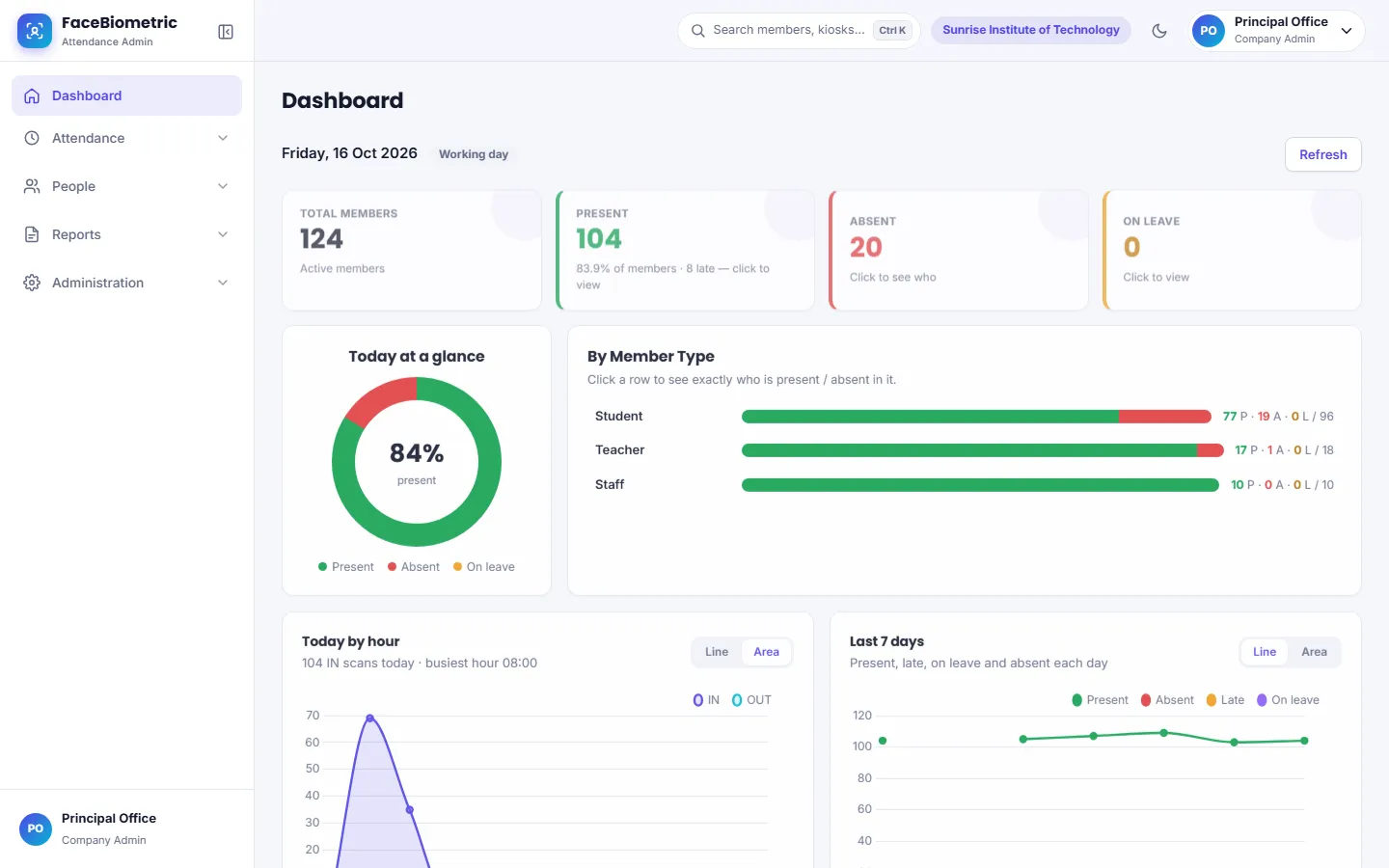
The live dashboard of FaceBiometric, shown with sample data. Take the product tour →
From the gate to the monthly report
One system for marking attendance, managing people, leave and holidays, and sending the right report to the right person.
Face recognition kiosk
An Android phone or tablet at the gate becomes the attendance kiosk. Face matching happens on the device itself, with a liveness check.
Works offline
Internet down? Scans are saved on the kiosk and upload automatically once it is back. Several kiosks stay in step with each other.
Live dashboard
Who is present, absent, late or on leave — right now, by hour, for the last 7 days and batch-wise for the month.
Ready reports
Daily, summary, department / course / batch, device-wise and more — PDF, Excel or CSV, with your filters in the file name.
Leave, holidays & shifts
Holiday calendar, leave types, multiple shifts with late / half-day rules, and leave requests from the member portal.
Alerts & integrations
Absent and late alerts by Email, SMS or WhatsApp, scheduled reports, and an API + webhooks for your ERP.
One look. Marked IN. Next person.
Designed for busy gates and morning rush — fast, simple, and hard to fool.
- IN / OUT switches automatically — or one IN per day, your choice
- Liveness check against photos and screens
- Optional attendance code or QR for extra verification
- Optional location fence so the kiosk works only on campus
- Locks itself when idle; admin PIN to open settings
Know your campus at a glance
A modern web panel that works on a laptop and on a phone.
- Dashboard with today, last 7 days and monthly batch-wise charts
- Graph reports — build any chart or pivot table in a few clicks
- Members, devices, users and permissions with View / Manage levels
- Light & dark themes, your own colours, sidebar or top menu
- Full interface in Hindi with one click
Wherever people need to be marked present
Colleges & universities
Students by course and batch, faculty and staff — with department-wise reports.
Medical & nursing colleges
Strict attendance rules, multiple shifts and audit-ready records.
Schools & coaching
Quick morning attendance and absent alerts to parents.
Offices & hospitals
Shifts, late marks, half days and monthly summaries for payroll.
Face data treated as what it is — sensitive
Matching happens on the kiosk, stored data is encrypted, every change is logged, and you control consent, downloads and deletion.
Face attendance — common questions
What is FaceBiometric?
FaceBiometric is a face recognition attendance system for colleges, schools, hospitals and offices in India. Members look at an Android phone or tablet kept as a kiosk, attendance is marked in about a second, and the admin office sees it live in a web dashboard with ready reports.
How does face recognition attendance work?
Each member's face is registered once on the kiosk. After that, the kiosk recognises the face on the device itself, checks that it is a live person and not a photo, and marks IN or OUT with the time. The record syncs to the admin panel, where daily and monthly reports are ready to download.
Do we need to buy a biometric attendance machine?
No. FaceBiometric does not need a special machine — any recent Android phone or tablet with a front camera (Android 7.0 or newer) works as the kiosk. You can use several phones at different gates, and the web panel runs in any browser.
Does face attendance work without internet?
Yes. The kiosk recognises faces and marks attendance even when the internet is down. The scans are stored safely on the phone and upload automatically when the connection returns, so no attendance is lost.
Is face attendance allowed under India's DPDP Act?
It can be used lawfully when people are told what is collected and why, and consent is taken — from a parent or guardian for students under 18. FaceBiometric records consent (online with a one-time code, signed form or phone call), lets you download or erase a member's data, and encrypts face data.
How much does a face attendance system cost?
FaceBiometric is priced by the number of active members and kiosks, with no hardware to buy. Share your number of students and staff on the contact page and we send a quote; a free demo is available before you decide.
Can parents get absent alerts on WhatsApp or SMS?
Yes. FaceBiometric can send absent and late alerts, daily summaries and kiosk-offline alerts by Email, SMS or WhatsApp, through the institution's own SMS / WhatsApp account. Each alert type can be switched on or off.
How to stop proxy attendance in college
Why registers, ID cards and fingerprint machines leave room for proxy marking — and the steps that close the gaps.
Read → PrivacyDPDP Act and face attendance: a consent checklist
Notices, consent (including parents of minors), retention, rights and records — in plain language.
Read → SetupSetting up a face attendance kiosk
Height, light, power and network — the details that make scanning fast on day one.
Read → AlertsAbsent alerts to parents by SMS and WhatsApp
DLT registration, sender IDs and approved templates — what has to be ready before the first alert.
Read →See it working at your campus
A short live demo on your own phone — we set up a sample college, you scan your face and watch the report update.